10 Best Open-Source LLMs You Can Run Locally in 2026
Open-source large language models (LLMs) let developers, businesses, and AI enthusiasts run powerful AI locally for better privacy, customization, and control. This guide explores 10 of the best open-source LLMs to run on your computer or server in 2026.

10 Best Open-Weight LLMs You Can Run Locally in 2026
Running an AI assistant on your own computer is no longer limited to researchers with expensive servers. With the right model size, a modern laptop or desktop can write drafts, summarise documents, help with code, and answer questions without sending every prompt to a cloud chatbot.
This guide covers ten strong open-weight language-model families for local use in 2026, plus the tools and hardware you need to get started.
A quick note: open-weight vs open-source
These terms are often used as if they mean the same thing, but they do not.
Open-weight means you can download and run the published model weights, subject to its licence.
Open-source usually refers to software whose source code can be inspected, changed, and redistributed under an open-source licence.
Many popular local LLMs are open-weight rather than fully open-source in every respect. Always read the model licence before using a model in a commercial product or redistributing it.
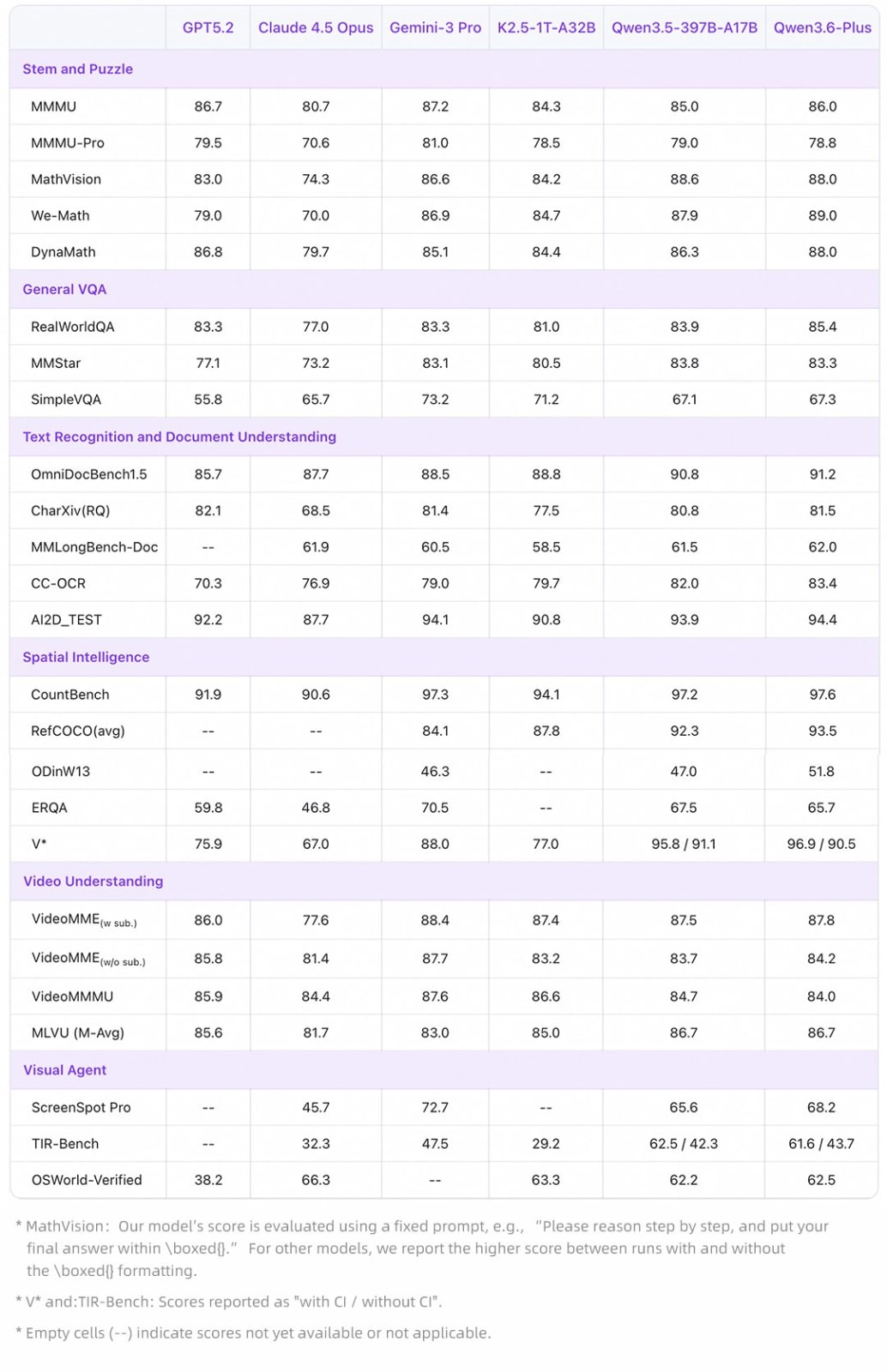
Figure 1: Data from Qwen
Why run an LLM locally?
Privacy and control
When a model runs entirely on your device, prompts and files can remain on that device. This can be useful for private notes, internal drafts, offline work, and experiments. Local does not automatically mean secure, though: protect your computer, use disk encryption, and avoid installing models or extensions from untrusted sources.
Predictable cost
After you download a model, there is no per-prompt API bill. You still pay for your own hardware, electricity, storage, and maintenance, but local use can be economical for frequent personal tasks.
Offline access
Once the model and runtime are installed, basic chat can work without an internet connection. This is useful while travelling, on restricted networks, or when you want to test an application without relying on an external API.
Customisation
Developers can choose a model size, use quantised versions, adjust system prompts, connect local documents through RAG, and fine-tune eligible models for a narrow task. Start with prompting and retrieval before fine-tuning; they are usually simpler and cheaper.
The 10 best local LLM families in 2026
The best model is not always the largest one. A smaller model that runs smoothly on your hardware is usually more useful than a huge model that takes minutes to respond.
1. Qwen 3 family — strong all-round choice
Qwen models are widely used by the local-AI community because the family includes options for different hardware levels and tasks. Look for an instruction-tuned Qwen model that fits your available memory and choose a quantised build if you are running it on a consumer computer.
Best for: general chat, coding practice, multilingual tasks, and experimentation.
Why consider it: Qwen offers a broad set of published weights and is supported by many local runtimes. It is a practical family to test if you want a capable model without committing to one vendor ecosystem.
2. Mistral Small 4 — efficient reasoning and coding
Mistral Small 4 is designed for a mixture of general chat, coding, reasoning, and agent-style work. It supports text and image input, which makes it more flexible than a text-only local assistant when your chosen runtime supports those features.
Best for: developers, technical users, and people who want one efficient model for several kinds of work.
Why consider it: it aims to balance quality and speed, rather than requiring a data-centre-sized model for everyday tasks.
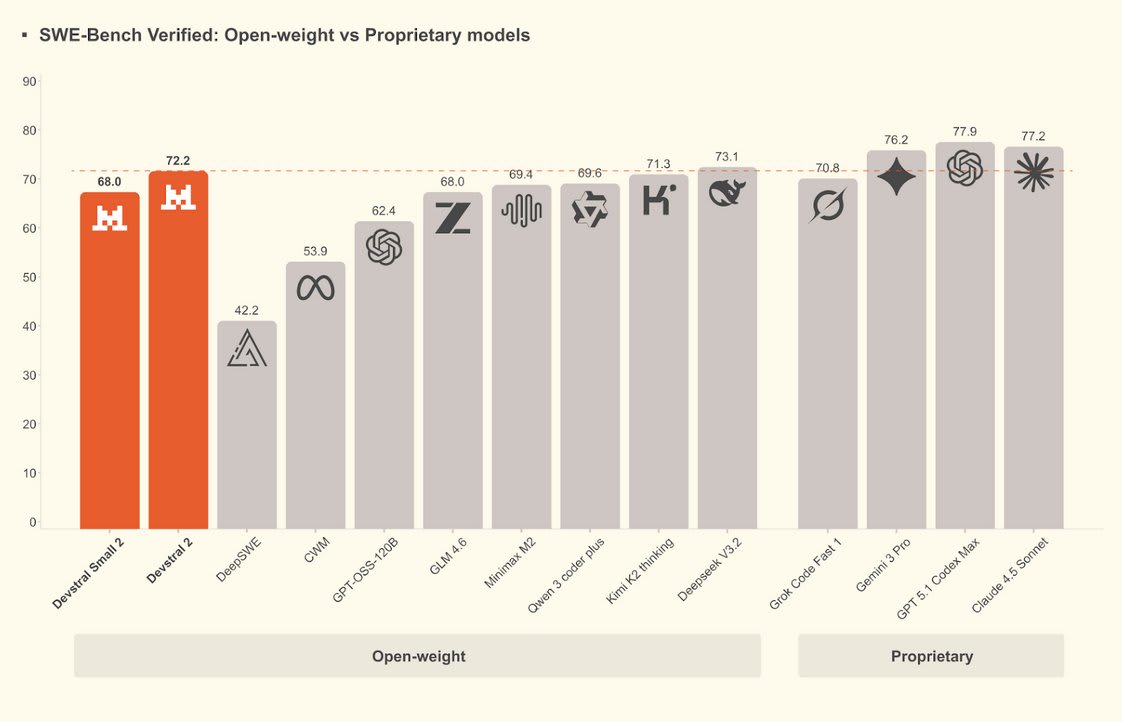
Figure 2: Data from Mistral AI.
3. Gemma 4 — Google’s compact open-model family
Gemma is Google’s family of open models built for developers who want to run AI on devices, workstations, or servers. The latest family includes multimodal options, so compatible variants can work with text and images, while selected smaller variants are designed for more constrained devices.
Best for: local prototypes, multimodal projects, and developers already familiar with Google AI tooling.
Why consider it: the family offers multiple sizes, making it easier to begin small and upgrade only when your task requires more capability.
4. Llama 3.3 — a popular ecosystem pick
Meta’s Llama models remain one of the best-known choices in local AI. Their large community means you can find many compatible quantisations, guides, prompts, and integrations.
Best for: general assistants, chatbots, RAG experiments, and learning local deployment.
Why consider it: strong community support and wide compatibility make Llama an approachable option. Remember that Llama uses a community licence, so check the current terms before commercial deployment.
5. DeepSeek-R1 Distill models — reasoning-focused experiments
DeepSeek-R1 Distill variants are commonly used by people who want to explore reasoning-oriented tasks without running a giant frontier model. Distilled models are smaller versions trained to preserve useful behaviour from a larger system.
Best for: maths practice, structured problem solving, code explanations, and technical experiments.
Why consider it: a smaller distilled model can be much more realistic for local hardware than attempting to run a very large reasoning model directly.
6. Phi-4 family — compact models for limited hardware
Microsoft’s Phi family is aimed at smaller, efficient models. These are useful when your laptop has limited RAM or you want fast responses for a focused task rather than maximum general capability.
Best for: learning projects, lightweight assistants, text classification, and simple automations.
Why consider it: smaller models can start quickly and work well on ordinary machines, particularly in quantised form.
7. Granite — practical models for business and code tasks
IBM Granite models are useful for developers exploring enterprise-oriented language and code workflows. The family includes options targeted at different practical tasks instead of one single general model.
Best for: internal prototypes, document tasks, coding support, and experiments where licensing and governance matter.
Why consider it: Granite gives teams another local option when they want to evaluate models with an enterprise mindset.
8. OLMo — transparency-first research model
OLMo, from the Allen Institute for AI, is notable for its research focus and openness around the development process. It is an appealing option for people who want to understand model training and evaluation more deeply, not just download a chatbot.
Best for: AI learners, researchers, academic projects, and transparency-focused experimentation.
Why consider it: it is a valuable choice when understanding how a model was built matters alongside its output quality.
9. Ministral 3 — edge-friendly Mistral options
Ministral models are designed for efficient deployment and are available in smaller sizes than many frontier-scale LLMs. They can be a good fit for a local assistant when you value quick responses and a smaller hardware footprint.
Best for: local productivity assistants, edge deployment, and small-server applications.
Why consider it: smaller models are easier to run in a home lab, on a laptop, or in a private application where latency matters.
10. Mixtral 8x7B — a proven mixture-of-experts option
Mixtral 8x7B is an older but still useful mixture-of-experts model. Rather than using every part of the network for every token, mixture-of-experts architectures activate selected experts. This can offer a different speed-and-quality trade-off from similarly sized dense models.
Best for: developers who want to compare architectures, self-hosted chat, and advanced local experimentation.
Why consider it: it has broad support across the local-AI ecosystem and remains a worthwhile benchmark when comparing models on your own hardware.
How much hardware do you need?
The answer depends on model size, precision, context length, runtime, and whether you use CPU, GPU, or Apple Silicon. Quantisation reduces memory use by storing model weights in fewer bits, usually with some quality trade-off.
Setup | A realistic starting point | What to run |
|---|---|---|
Entry level | 16 GB system RAM, CPU or integrated graphics | Small 2B–8B quantised models |
Comfortable local setup | 32 GB RAM or a GPU with 8–12 GB VRAM | Many 7B–14B quantised models |
Enthusiast workstation | 64 GB+ RAM or a GPU with 16–24 GB+ VRAM | Larger 14B–32B models and selected multimodal models |
High-end server | Multiple high-memory GPUs | Large models, high concurrency, and long-context workloads |
These are starting points, not guarantees. A long context window increases memory demand because the model must store additional attention data. Before downloading a model, read its model card and check the runtime’s memory estimate.
Best tools for running local LLMs
Ollama
Ollama is one of the simplest ways to download and run a model locally. Its command-line workflow and local API make it popular with developers building Node.js, Python, and desktop applications.
LM Studio
LM Studio offers a desktop interface for downloading compatible models, adjusting settings, and chatting locally. It is a good choice if you prefer buttons and menus over terminal commands.
llama.cpp
llama.cpp is a lightweight open-source inference project with broad support for quantised GGUF models. It is ideal for users who want fine control, efficient CPU execution, or integration into their own software.
Open WebUI
Open WebUI gives you a browser-based chat interface that can connect to local model runtimes. It is useful for a home server, a small team, or anyone who wants a ChatGPT-style experience without leaving their own infrastructure.
A safe beginner setup
If you are new to local AI, avoid downloading the biggest model first. Start with Ollama or LM Studio, choose a small instruction-tuned model, and test it with your actual work.
Check your available RAM and GPU memory.
Install Ollama or LM Studio from its official website.
Download a small quantised model from a trusted source.
Test it with a few realistic prompts: a summary, a coding question, and a writing task.
Increase model size only if the responses are too weak and your machine has spare memory.
For example, developers can connect a local model to a simple RAG application, while content creators can use one to brainstorm outlines and rewrite private drafts. Do not expect a small local model to match the speed or capability of every cloud flagship model; the advantage is control and privacy.
Advantages and limitations of local LLMs
Advantages
Greater control over where prompts and documents are processed
No per-request API charge after setup
Offline use for basic local tasks
Freedom to test different models and runtimes
Ability to customise an application around your own workflow
Limitations
Large models need significant RAM, GPU memory, storage, and power
Setup and troubleshooting take more effort than using a web chatbot
Model licences can restrict certain commercial uses
Local models may be slower or less capable than paid cloud models
You remain responsible for updates, security, backups, and monitoring
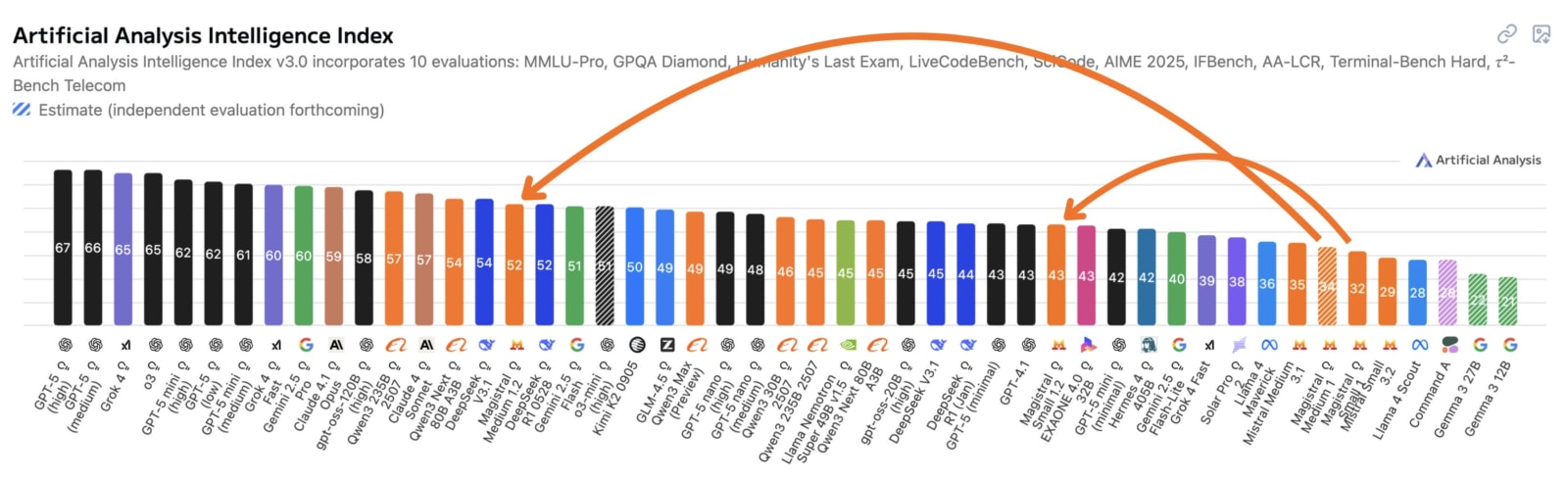
Figure 3: Data from Mistral AI.
Final
Local LLMs are a practical way to learn AI, build private prototypes, and reduce reliance on paid APIs. The best starting point is a modest model that runs reliably on the hardware you already own. Once you understand what you need—faster responses, better coding, longer context, or image input—you can test a larger model family.
Start small, use official model pages, review licences, and keep sensitive data protected. A local model does not need to be the biggest one to be useful; it only needs to solve a real task well on your own machine